The Architecture of Delivery

Understanding the fundamental difference between IMAP and POP3 is not just technical trivia—it is the deciding factor between a chaotic, fragmented inbox and a unified, synchronized command center. We break down the mechanics of how these protocols handle data, storage, and device synchronization to give you a clear mental model for your email infrastructure.

1
POP3
N
IMAP
Downloads & Deletes Removes from server
Syncs & Mirrors Keeps on server

"One stores locally, the other lives in the cloud."

The Core Trade-off

You must choose between local control (POP3) and universal access (IMAP).

The German Context

Strict privacy laws favor protocols that leave no trace on shared machines.

The Verdict

For 95% of modern users, IMAP is the only viable architectural choice.

The Synchronization Paradox

Why do so many users still cling to POP3? Often, it is a misunderstanding of how "Sync" actually functions. Below, we map specific user behaviors to the protocol that inevitably causes them friction.

The "Deleted" Trap

Scenario: You delete an email on your phone.
POP3 Behavior: The email is permanently removed from your desktop client's local storage, creating a fragmented archive.
IMAP Solution: The deletion syncs instantly across all devices. The clutter vanishes everywhere.

The "Sent Folder" Gap

Scenario: You send a quote from your laptop while on a train.
POP3 Behavior: The "Sent" item stays on the laptop. You cannot access that quote from your office PC later.
IMAP Solution: The "Sent" folder is a mirror. The quote is ready for retrieval in your office.

The "Storage Clog"

Scenario: You have 10 years of archives.
POP3 Behavior: Forces a massive download to a single machine. Backup becomes your problem.
IMAP Solution: Keeps the heavy lifting on the server. You only download headers until you need the body.

Privacy Badge
DSGVO Compliant Protocol dependent

The German Context: Security & Provider Constraints

Operating within the German digital ecosystem requires a heightened awareness of data residency and encryption standards. While the protocol itself does not dictate privacy laws, the implementation method determines your liability and exposure.

1

Server-Side Deletion (POP3 + "Leave on Server")

Many German ISPs (like 1&1 or Telekom) impose strict storage quotas. POP3 without careful configuration leads to server-side clogging, triggering automatic purges that violate retention policies.

2

Transport Layer Security (TLS)

IMAP connections in 2026 must enforce STARTTLS on port 993. POP3 (Port 995) is often blocked by modern firewalls on public Wi-Fi in Berlin and Munich.

3

The "Local Device" Risk

POP3 downloads data to the device. Under DSGVO, if that device is lost or stolen, you have a reportable data breach. IMAP leaves the data on the secured server.

Head-to-Head: Technical Specification

A snapshot of how the protocols handle real-world constraints.

Feature IMAP POP3
Storage Location Server (Cloud) Local Device
Multi-Device Sync Native Manual / Impossible
Bandwidth Usage Low (Headers Only) High (Full Download)
Search Capability Server-Side (Fast) Local Only (Slow)
German Privacy Risk Low Medium (Local Theft)

Failure Modes: Protocol Misconfigurations

Based on support tickets from German ISP users, these are the three configuration errors that lead to data loss or connectivity failures.

FAIL "Delete from Server after X Days" (POP3)

The Mistake: Setting a POP3 client to "Delete from server after 14 days" to save space.
The Consequence: You lose historical context for ongoing threads if you check email sporadically on that device. IMAP's "Archive" folder is the correct solution.

FAIL No "Sent" Folder Sync (POP3)

The Mistake: Relying on POP3 for work email but failing to map "Sent Items" to a server-side folder.
The Consequence: Auditors or clients request proof of correspondence. You cannot provide it because the trail is fragmented across local machines.

WARN IMAP IDLE on Unstable Connections

The Issue: Mobile devices using IMAP IDLE (Push) on poor networks drain battery fighting for connection.
The Fix: Increase poll intervals on mobile or rely on Microsoft Exchange ActiveSync (EAS) if available, rather than raw IMAP IDLE.

The Verdict: Choosing Your Protocol

We recommend IMAP for virtually every modern use case. However, legacy systems and specific archival needs sometimes require POP3. Use this decision lens to choose correctly.

Return to Protocol Home
Choose IMAP If:
  • You use more than one device.
  • You need reliable search across years.
  • You work in a team environment.
Consider POP3 If:
  • You have a single, offline workstation.
  • Bandwidth is severely restricted.
  • You have strict local-only data policies.

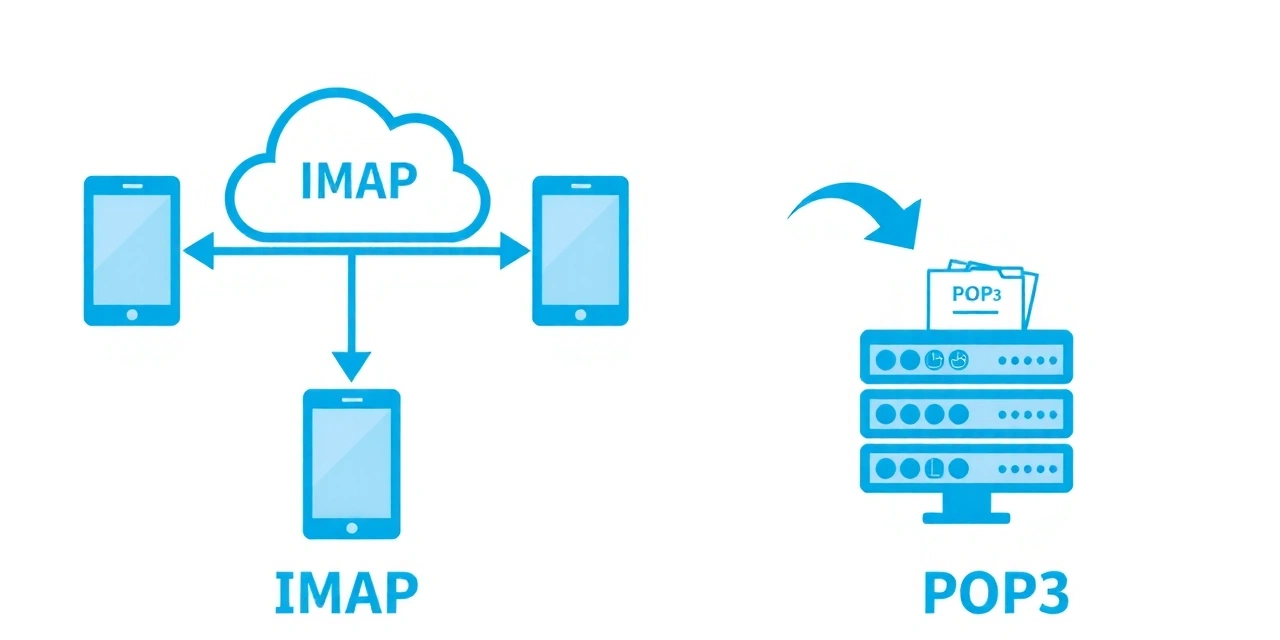
Visualizing the Data Flow

How headers move between servers and devices.

IMAP vs POP3 Data Flow Diagram
Figure 1: Visual distinction of synchronization directionality. IMAP is bidirectional; POP3 is transactional.

Ready to optimize your workflow?

Now that you understand the architecture, discover how to apply "Inbox Zero" principles to your specific setup.